
What Is Coding? A Plain-English Guide With Real Examples

.png)


Ever since I was in my mid-late teens I’ve heard people throw around the phrase, “you really should learn to code”. I would picture a huge display screen in a dark room, a wildly expensive keyboard made only for people who spend 12 hours a day in front of a computer, and, of course, giant noise canceling headphones. But what does coding mean? What is “code”? Where does it run and who writes it? And once it’s written where does it go?
For most of us, we open our phone or our computer and it just works. Our experience is often so fast and seamless that hardly any of us stop to consider the mass quantities of effort, time, and experience that have gone into making it that way. And that makes sense. After all, one of the primary focuses of web development is to make the user’s experience so quick and easy that they don’t ever need to stop and ask, “who built this?”
Let’s peel back the layers of what “coding” actually means. When people talk about “coding,” they might be referring to any number of programming languages; from the Python scripts that train AI models, to the C code running inside your car, to the JavaScript that makes a button on a website clickable. In essence, all of these languages share the same goal: they tell computers what to do, step by step. So, when someone says, “you should learn to code” what they mean is, “you should learn to write these instructions to build things and solve problems that didn’t exist before”.
For beginners, the algorithmic nature of these instructions can feel foreign and the path to writing them yourself can be daunting. And yet, that rigid, structured logic is also what makes coding simple: given a set of instructions (code) the computer will do exactly what it’s told, exactly the same way, every single time. And just like any language, once you get the hang of it, an entire world of possibilities opens for you.
In this article, we’ll take a look at how coding works in the plain language that you, the reader, are familiar with. For simplicity, we’ll focus on a few examples that are easiest to visualize, like the code behind websites (JavaScript). But remember, the same core ideas apply no matter what language or platform you’re working with.
When I began writing this article, I went on a search for what three words developers would use to describe coding and was highly entertained by what I found on dev.to. Among my favorite answers were, “Computers hate me”, “all the bugs”, “ctrl, alt, z”, “oh my god”, and “hours of toil”. I absolutely see where these devs are coming from. Some said, “Words become reality”, and “Iterate, Improve, Repeat”. I like those too. For someone looking into the coding basics, the three words I would use are “syntax, logic, order”.
Each and every language follows certain logic, and often this logic aligns with that of other languages. For example, JavaScript allows you to create loops using keywords like “for” and “while”, which you’ll often see referred to as “for loops”, “while loops”, etc. These “control flow structures” allow you to repeat a set of instructions until a certain condition is met. Other JavaScript logic includes if/else statements (if this happens, do this, otherwise do this) and logical operators like “&&”, “||”, and “!”. Logical operators are small symbols that help your code make decisions. “&&” means both conditions must be true, “||” means only one needs to be true, and “!” flips a true to false, or false to true. Here’s the kicker: nearly every modern language has its own looping mechanisms, if/else logic, and logical operators even if the syntax for expressing that logic differs.
I’ve heard it said many times (and agree) that the hardest language to learn is the first one you tackle. Having started with JavaScript, known for its flexibility and the fact that there are often several ways to achieve the same goal, I can confidently say that once the logic is understood, picking up the syntax is the easy part. Languages may often share similar logic but have their own syntax for variables (labels for data), loops, and conditionals. Let’s take a look at two chunks of code that do the same thing, one written in JavaScript, another in Python. Even without having seen much code yourself, can you spot the similarities?
const name = "Alex";
let age = 33;
let isHappy = true;
name = "Alex"
age = 30
is_happy = True
for (let i = 0; i < 3; i++) {
console.log(i);
}
for i in range(3):
print(i)
if (x > 10) {
console.log("Big!");
} else if (x === 10) {
console.log("Exactly 10!");
} else {
console.log("Small!");
}
if x > 10:
print("Big!")
elif x == 10:
print("Exactly 10!")
else:
print("Small!")
One phrase you’ll hear thrown around quite often as an engineer is “control flow”. Control flow is the order in which your code’s instructions are executed. In other words, the path your program takes as it runs.
Not unlike the route a GPS follows, sometimes your code:
So, control flow determines which lines run, which are skipped, and which repeat. Below, you’ll see an example in plain English (pseudo code) of what this order might look like:
Start
↓
Check if user is logged in
→ If yes: show dashboard
→ If no: ask them to log in
↓
Repeat until user logs out
↓
End
When you want to write a story, your words need somewhere to live; on a piece of paper, in a notebook, or in a word document. You could think of those pages as your story’s environment.
Similarly, your code also needs an environment to live in. But unlike static words on a page, code needs to run. That’s what powers applications and makes them dynamic and interactive. JavaScript needs two things to make that happen:
So where does it actually run?
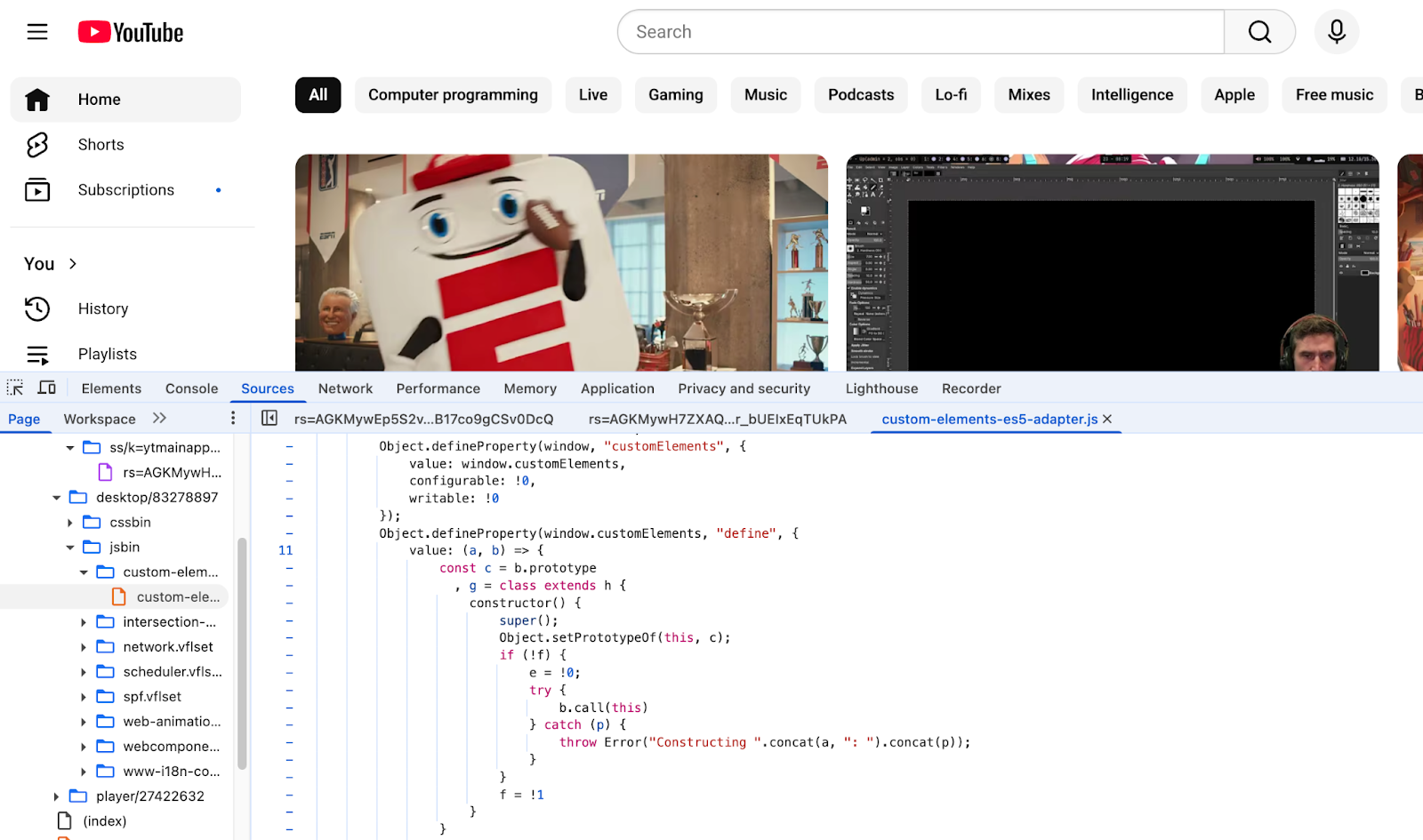
In web development, the browser runs the part of your web application that the user interacts with: dashboards, buttons, dropdown menus, etc. It understands JavaScript, HTML and CSS, and provides both an environment in which to run that code as well as an engine to power it (V8, JavaScriptCore, Spider Monkey). Below is an example of front-end JavaScript code being run in a browser.
Meanwhile, a web application also requires a server in order to run your backend logic. Backend logic is the code that sends instructions to the user’s browser and/or handles anything you need to retain maximum control over, like user authentication or connecting to databases. You also might provide an API (Application Programming Interface) which allows your other programs (for example the code you just sent to be run on your user’s browser!) to securely communicate with your backend.
Much like a browser, a JavaScript server needs both a runtime environment and an engine to run your code. And just like how you have the option of using Chrome, Safari, Firefox or any other browser on the frontend, there are quite a few backend runtime environments to choose from, including Node.js, Deno, or Bun, all of which also use Chrome’s V8 engine).
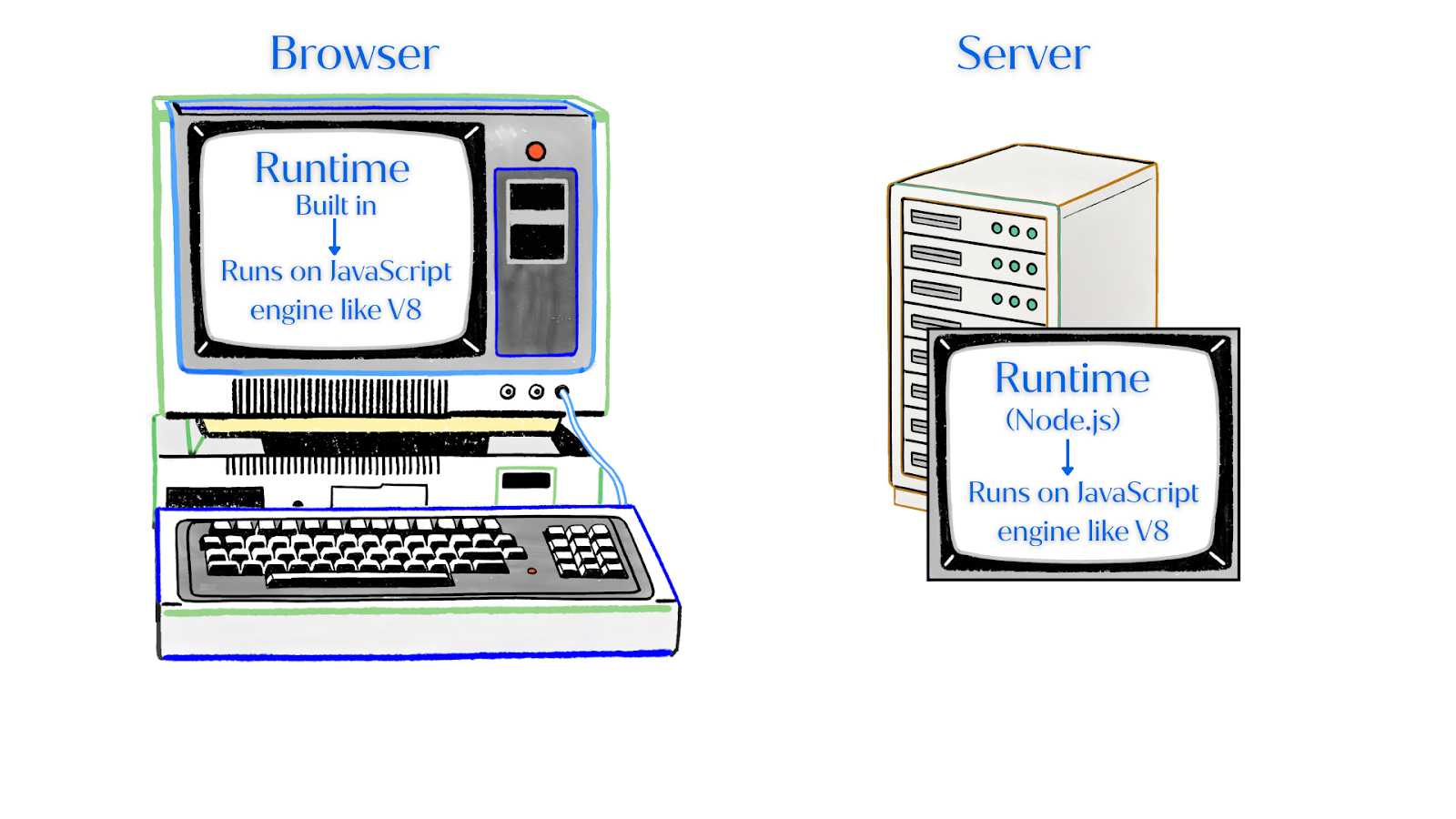
Note that unlike browsers, servers don’t always run JavaScript! In fact, you can use any number of languages server side, like Python, Java, or Go. It all just depends on the project.
Servers used to be thought of as just physical machines but, today, they often operate in the cloud which simply means that they are also “virtual machines”. Amazon Web Services (AWS) EC2 is a great example. It provides virtual servers that can run your backend code in the cloud without you having to manage physical hardware.
So, we’ve talked about how servers run your backend logic using a runtime environment that comes with its own engine (like Node.js which uses the V8 engine). The server can run JavaScript, Python, Go and many other languages. We also now know that your browser reads and executes JavaScript code by providing a runtime environment of its own and using a JavaScript engine (V8, JavaScriptCore, SpiderMonkey, etc).
Together, the browser and the server form the foundation of most modern web applications. The browser (frontend) handles everything the user sees and interacts with and the server (backend) processes data, communicates with databases, and sends information back to the browser. Think about when you click a button, submit a form, or load a new page. When you do that, your frontend JavaScript code sends requests to the backend (your server). The server then runs its own code and returns the results. And that all happens in just a matter of milliseconds! This back-and-forth is what makes the web dynamic and interactive.
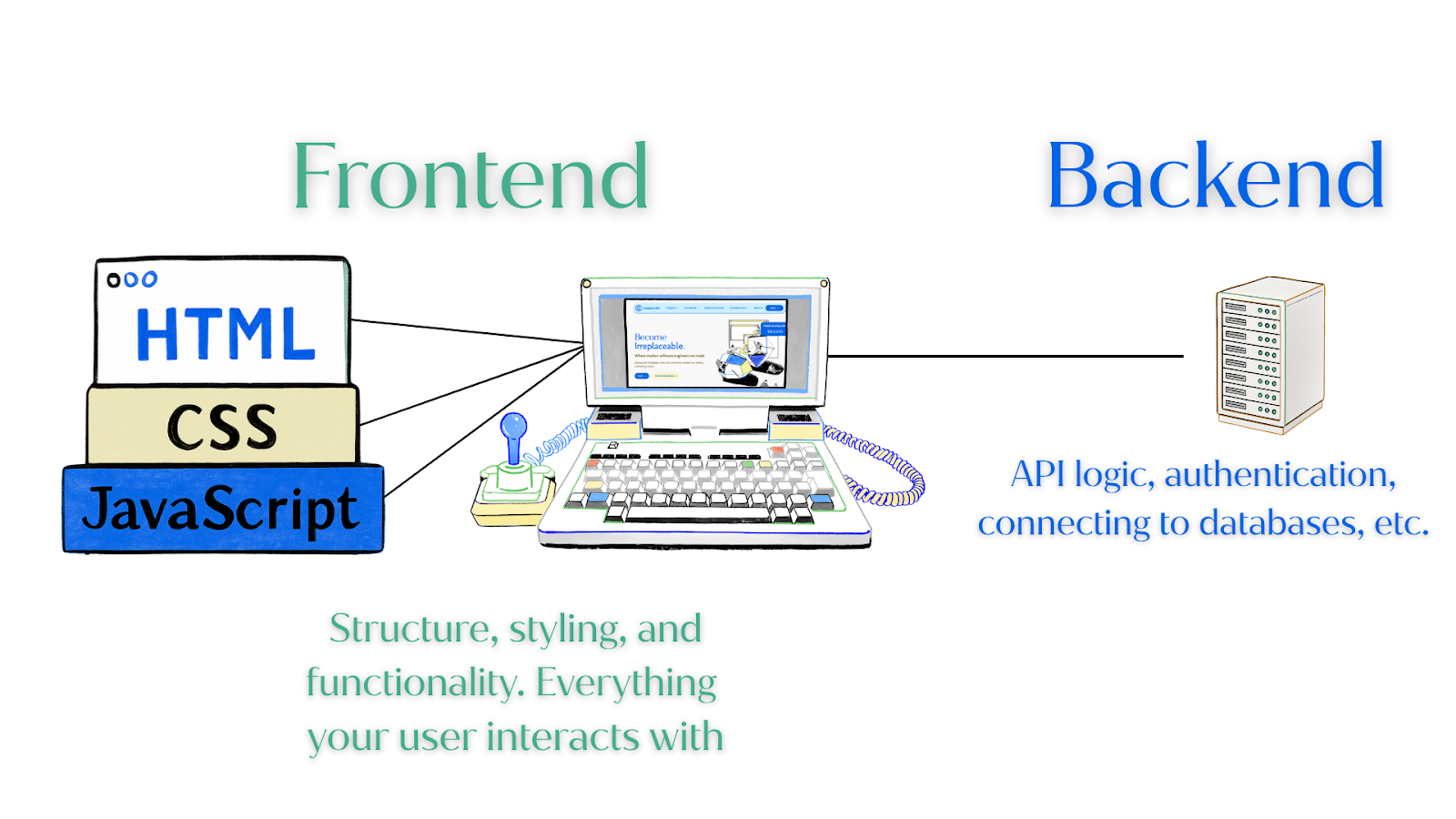
So your browser runs JavaScript to make it interactive. But what about the overall structure and styling? Where does that come from? When you visit a website, what you see on the screen is actually built with three core languages working together.
At its core, coding isn’t about typing strange symbols or memorizing syntax, it’s about building something from nothing, problem solving, and always learning. I like to think of coding as the language that turns imagination into real tools and experiences.
Making the choice to become a software developer is no small decision. It requires a tremendous amount of work, patience, and perseverance. That said, every app, every website, every “smart” device around you was built with lines of code written by someone else who also once wondered the same thing as you, “what does coding actually mean?” The only difference between them and you is practice and a bit of curiosity to keep peeling back the layers.
So where do you even start?
At Codesmith, we believe JavaScript is the best place to start. It is the engine that powers a web page’s interactivity, making it dynamic. Think about a car. HTML is the structure of the vehicle (the wheels, doors, frame, etc.). CSS is the styling (paint color, leather interior, window tint, etc). JavaScript is the engine that makes that car move forward, left, right, reverse, speed up, slow down, etc. It also happens to be the most commonly used language for application development.
Not only is JavaScript great to start with because of its popularity, it’s tricky. Often there are a multitude of ways to do the same thing, some more efficient than others depending on what you want your app to do. This means that, once you’ve gotten comfortable with it, picking up HTML, CSS or even other programming languages like Python becomes much easier. That means that, once you’ve learned JavaScript, you’re ready to start building with it and, who knows, maybe even ready to start playing around with libraries like React or languages like TypeScript!
Practice daily. Repetition is key and even committing to 30 minutes a day can make a huge difference. That’s why CSX, Codesmith’s free online learning platform, has been used by thousands of engineers looking to get started. It takes you from the very basics like variable declarations, data types, and loops, to the tough stuff like recursion, scope and closure, and object oriented programming. As you work through the modules, you can ask for help and pair-program with an entire community of people through Codesmith’s CSX slack workspace.
Build small projects. Once you’re more comfortable with JavaScript, find out how it works with HTML and CSS by building a calculator, a to-do list, or even a personal site. This is why when students enroll in Codesmith’s Software Engineering and AI/ML Immersive program, they have an entire week (called “Zero Week”) dedicated to this. That way, once you officially start the program, you’re ready to bump things up and build entire full stack applications with modern libraries and frameworks.
Get curious. Look under the hood of websites. Open up your developer tools in your browser and click around. Since your browser uses the V8 JavaScript engine to run, you can even open the console and play around with JavaScript right there! Command + Option + J (Mac) or Ctrl + Shift + J (Windows) will open your console.
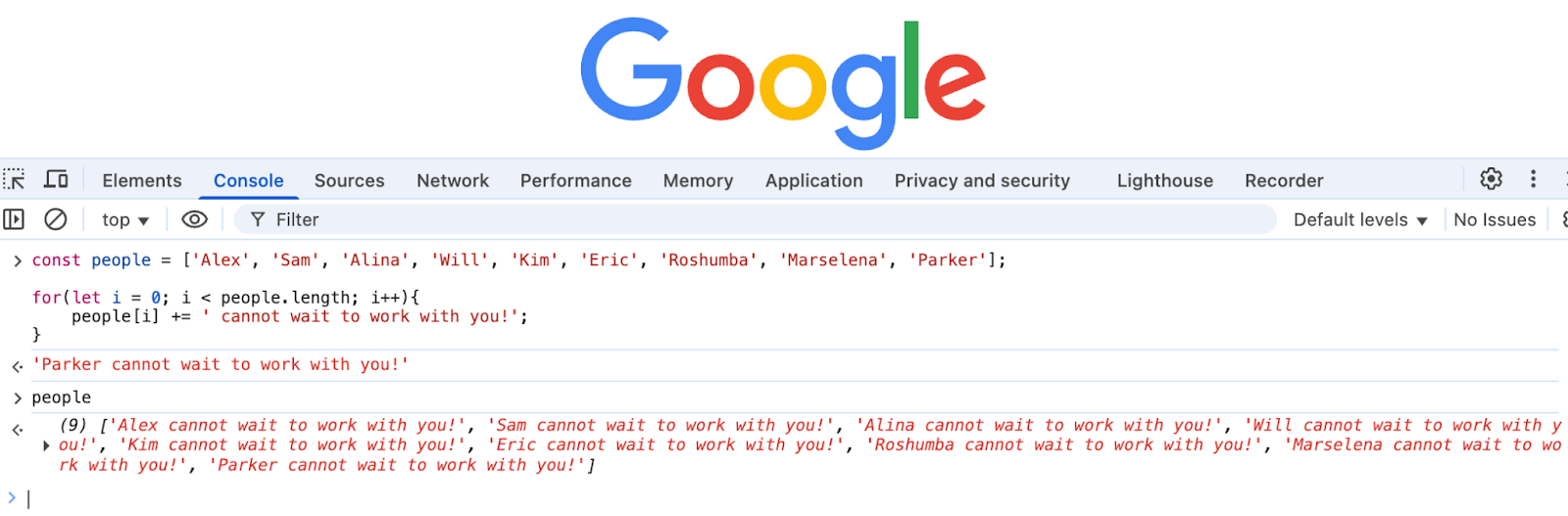
So don’t wait! Get started today and write your first line of code!


Explore CS Prep further in our beginner-friendly program.
Get more free resources and access to coding events every 2 weeks.

Connect with one of our graduates/recruiters.

Our graduates/recruiters work at:


Alex Stewart is a former professional actor turned software developer and proud Codesmith alumni. Alex works to make technology both fun and accessible through tech talks, video tutorials, and blogs. With hands-on experience in React, Node, SQL databases, and more, Alex brings a deep respect for the development process and is committed to finding new ways to connect with developers and showcase their incredible work in the way it deserves.


Connect with one of our recruiters to learn about their journeys.
Our graduates/recruiters work at:


Copyright @ 2025 Codesmith | All Rights Reserved
Terms and ConditionsPrivacy PolicyRegulatory Information


.png)
.png)